Why Is My PS5 Screen Flickering?
If you’re wondering why you’re experiencing the PS5 screen flickering issue, there could be a number of reasons. The most common one is a handshake problem from the HDCP or transfer rate to the HDMI cable — or your HDMI cable may be damaged or faulty. Resolving this could be as simple as replacing your HDMI cable, or might involve tinkering with some settings on your PS5. For the PS5, an HDMI 2.0 or high-speed HDMI cable is the one to get. We’ll also look at some other things that could be causing the problem and ways to fix it below.
1. Restart Your PS5
Turning it off and on again may be an age-old solution to common tech problems, but it rings true here, too. Restarting your console might make the issue go away if you’re looking for a temporary fix. If this resolves your problem for good, great! However, you might find the flickering starts up again after your PS5 has been on for some time.
2. Try Using Your PS5 Horizontally
This may sound a bit strange, but bear with us. If your console is usually vertical, try lying it down horizontally. This has solved the screen flickering issue for some people.
3. Disable HDR
If it seems like your PS5 screen flickering started after you edited HDR settings, you can try changing the settings back, then ensure HDR is disabled on both your console and your TV. Hopefully, this will solve the issue. Here’s how to disable HDR on your PS5:
4. Adjust Your Transfer Rate Settings
If you’re still experiencing issues with your PS5 screen flickering, you can try changing the 4K transfer rate to -1 or -2, as this seems to fix the issue for many gamers. Here’s how to do that:
5. Disconnect your PS5
Handshake issues with your HDMI cable could be the culprit of your PS5 screen flickering. Disconnecting everything could help! Here’s what to do:
6. Adjust Resolution, RGB Mode, and HDCP Settings
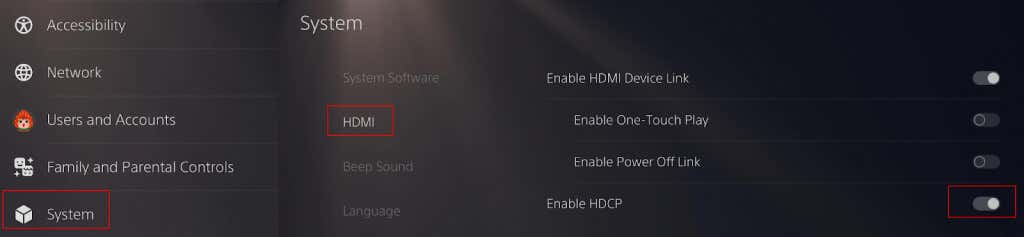
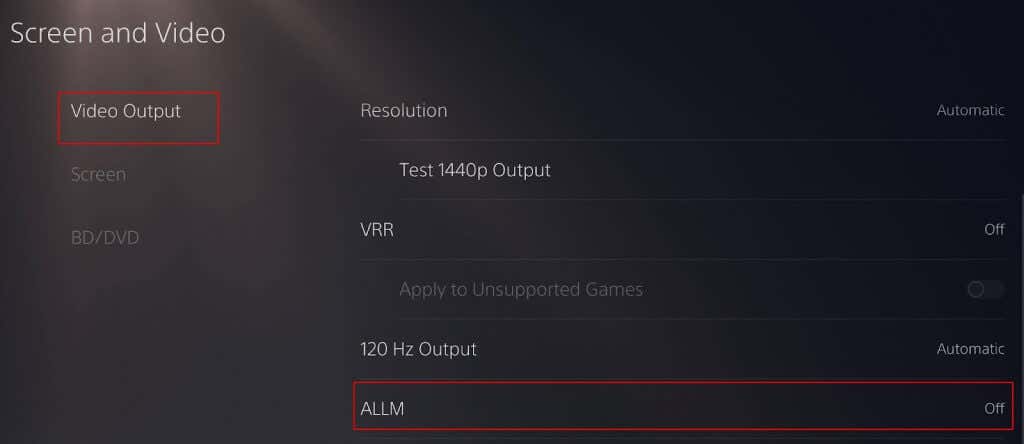
If none of the above fixes have worked for you so far, another thing you can try is disabling game mode and HDCP (high-bandwidth digital copyright protection) by going into your PS5 settings. HDCP prevents external devices recording video from your console, so don’t disable this if you’re using a game capture device to record video. If you want to disable HDCP, here’s how to do that: To turn off game mode, go to Settings > Screen and Video > Video Output > ALLM and turn the setting off. You can also disable your TV’s Game Mode to see if this helps. The PS5 screen resolution is set to Automatic by default. However, if you’re experiencing PS5 screen flickering, you can try reducing the resolution to 1080p to see if this resolves the issue by going to Settings > Screen and Video > Resolution and manually selecting 1080p. Setting the RGB Range to full or limited may also help. Here’s how to do this:
7. Update your PS5
Not having the latest updates installed on your console could be causing issues. Try updating your PS5 system as well as your TV firmware to see if you can fix the screen flickering problem. To do this, go to Settings > System > System Software > System Software Update and Settings to check for the most recent updates.
8. Enable Performance Mode
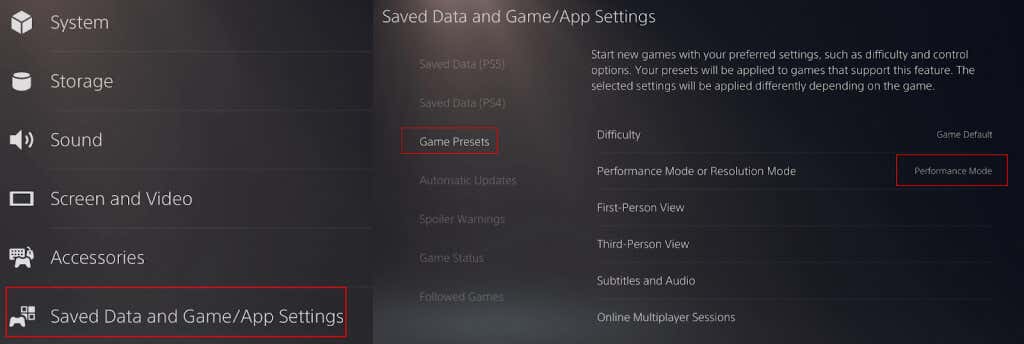
The PS5’s Performance Mode favors high frame rates, and turning it on might help with issues if your PS5 screen is flickering. Here’s how to enable it:
9. Adjust Screen Size/Display Area
Still no luck? Some PS5 owners have reported that adjusting the screen size or Display Area so it’s a bit smaller has resolved issues with screen flickering. Here’s how to do that:
10. Replace Your HDMI Cable
Hopefully, one of these fixes worked for you! If none of these fixes have stopped your PS5 screen flickering, it might be time to reach out to the retailer you bought your PS5 from, if you purchased it recently, or to Sony for support and a repair or replacement so you can get back to gaming. Before you go, check out our fixes to try if your PS5 isn’t connecting to your TV.