1. Restart Your Mobile Device or Computer
Restarting your mobile device or computer can resolve many common issues with Instagram, including problems where it keeps logging you out.
2. Check Your Internet Connection
Your internet connectivity could be the reason why Instagram keeps logging you out. Check your router and restart it if necessary. Make sure you’re in an area with a good internet connection. If you’re using public or shared Wi-Fi, check the signal strength.
3. Check if Instagram Is Down
The reason Instagram keeps logging you out could be as simple as a server outage. You can check DownDetector to see if Instagram is currently down and report the problem you’re having with the site or app if there are no known outages.
4. Update Instagram App
Ensuring you’re running the latest version of the Instagram app means you’ll have all the latest bug fixes. Your app should update automatically, but you can always check in the Google Play Store, Apple App Store, or Microsoft Store if you’re running the latest version of Instagram.
5. Check Your Device’s Time and Date Settings
If your device isn’t showing the correct time and date, Instagram could respond by repeatedly logging you out of your account due to a security conflict from certificates on your device and Instagram’s servers.
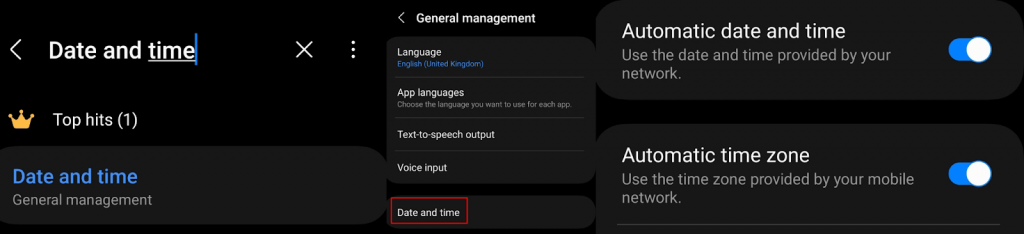
Though your devices should update their time and date automatically, you can check these settings are enabled and update the time and date manually, if needed. Here’s how to do that on Windows devices and Android devices.
Update the time and date on a Windows PC
Update the time and date on an Android Device
6. Clear Instagram Cache
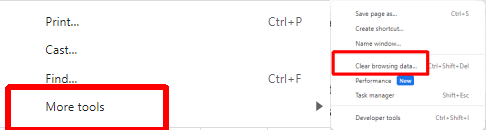
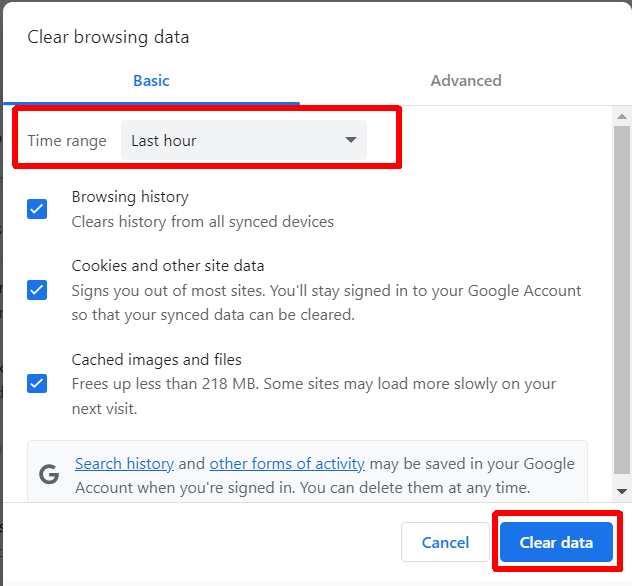
A corrupted cache could be at fault if Instagram keeps logging you out. Luckily, it’s easy to clear your Instagram cache on your PC or mobile device, and here’s how to do it on the Instagram app and in your browser.
Clear the Cache in the Instagram app
Clear the Instagram Cache in Google Chrome
7. Disable Browser Extensions
If Instagram logs you out while using the platform in your browser, it may be an issue with your browser extensions. A specific browser extension may be causing conflict with Instagram. Try turning off browser extensions to see if this fixes the problem.
8. Disable Your VPN
A VPN is a great way to browse privately and can also be beneficial for accessing content locked to another location. However, your VPN could be preventing access to Instagram or specific content on Instagram, causing the platform to log you out repeatedly. Try disabling your VPN to see if this fixes the problem.
9. Disable or Remove Third-Party Apps
If you’re using a third-party app to access Instagram from your mobile device — such as an app that lets you sign in with multiple accounts — this may be the reason Instagram keeps logging you out. Sometimes, these apps create bugs that can affect your Instagram experience. If you suspect this is the case, disable or remove them from your device to see if this resolves things.
10. Reinstall Instagram
Is Instagram still logging you out or crashing? Perhaps the app is corrupted. Try uninstalling then reinstalling the app on your device, and hopefully the issue will be fixed.
11. Check Your Account Hasn’t Been Hacked
Instagram may keep logging you out if your account has suspicious activity. Keep an eye on any unusual logins or activity indicating your account has been hacked. If you suspect you’ve been hacked, change your Instagram password immediately and consider turning on two factor authentication to protect your account.
12. Contact Instagram Support
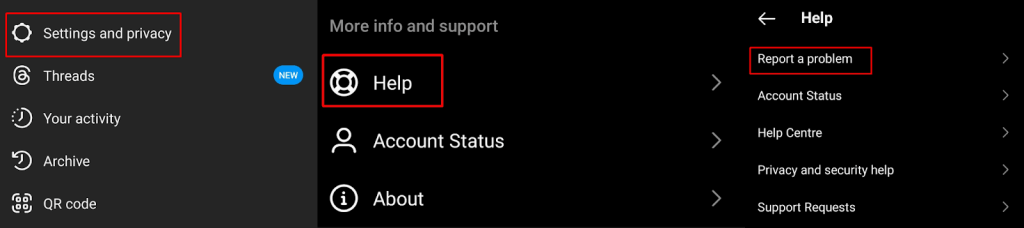
If none of the above fixes have worked for you, it’s time to contact Instagram support. The support team should be able to help you figure out what’s causing your issue and come up with a fix that should hopefully mean you don’t have to worry about Instagram logging you out every five minutes. Here’s how to contact support through the Instagram app: Hopefully, one of these fixes has worked for you, so you’re not still wondering, “Why does Instagram keep logging me out?” Most of these fixes only take a few seconds to a few minutes to implement, and often, the issue with Instagram logging you out can be resolved quickly. Before you go, here’s how to fix Instagram lagging on Android and iPhone.