That’s where rebuilding the database on your PlayStation 5 can make a difference, and this tutorial will provide step-by-step instructions to help you with that.
Why You Should Rebuild the PS5 Database
The database on your PS5 is where the console stores essential information, including data about installed games, saved game files, and media gallery items. However, over time, it can get cluttered with redundant, broken, and obsolete data.
Suppose you’re experiencing slower loading times, game crashes, or other unexpected behaviors—e.g., game and app icons remaining on the Home Screen long after uninstalling them. In that case, these can often be signs that the database needs rebuilding.
A PS5 database rebuild reorganizes your data, cleans up loose ends, and enhances how your PS5 functions, leading to smoother interactions and gaming experiences. Don’t worry—nothing gets deleted.
The problem? This procedure can take anywhere from just minutes to several hours, depending on the data on your console. Expect the time to substantially increase if you have an NVMe SSD in the expansion bay or an external drive for copying and moving data.
Because of the potentially time-consuming nature, it’s a good idea to rebuild the PS5 database after working on other applicable fixes related to the issue you’re encountering. For example, have you tried updating the PS5’s system software?
How to Rebuild the PS5 Database
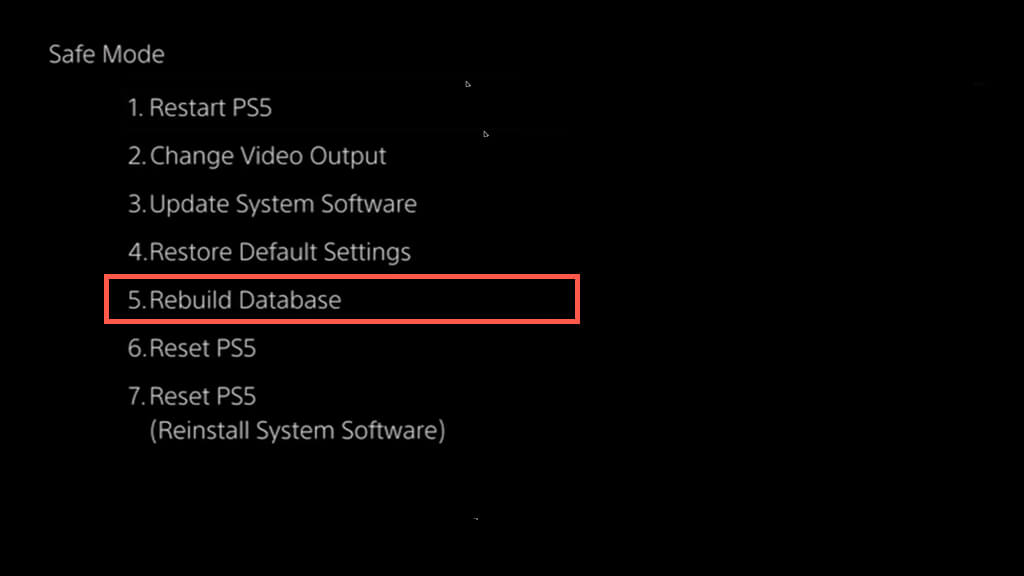
Rebuilding the PS5 database is a straightforward process that can be done after booting the console into Safe Mode. But what is Safe Mode? It’s a separate startup environment where you can perform maintenance and troubleshooting activities, including database rebuilding.
Before you begin, you must completely shut down the console—press the PS button on the DualSense wireless controller, select Power, and choose Turn Off PS5. You must also connect the expanded storage drive if one is set up. Then:
Note: Depending on the make and model of your PS5, you might see the option simply labeled as Rebuild Database.
Warning: Do not disconnect your PS5 from its power source during the database rebuilding phase since that can severely corrupt the console’s system software.
Your PS5’s Database Has Been Rebuilt
A healthy PS5 database is crucial for a smoother experience with the console, and a complete rebuild can play a significant role in getting it out of a rut.
The process takes a while to complete, but with luck, you’ll only have to do that a handful of times over the years. If time is not an issue, there’s no harm in repeating the action once every few months as a maintenance measure.
Just remember—rebuilding the PS5’s database is not the ultimate solution to all issues. If you continue encountering problems, other advanced troubleshooting techniques exist, like resetting the PS5 to factory defaults.