The mute function lets you filter out specific words, usernames, etc., preventing them from appearing on your screen while browsing. You can use this feature on both X for the Web or mobile app.
How Muting Works on X (Twitter)
X lets you filter out specific words, phrases, usernames, emojis, or hashtags you want to avoid. Once you’ve muted these terms, you won’t see Tweets that contain these terms in your Notifications tab, Home timeline, or email notifications, as well as push notifications you might get from X. Here’s some additional information you should know about the mute function.
Case-Insensitive: Muting isn’t case-sensitive. If you mute “Ford,” then any variation of that, such as “FORD,” “ford,” and “fORD,” is muted. Punctuation: You can add punctuation to terms you want to mute, but you don’t need to add the punctuation if you expect that term to come at the end of a sentence. Hashtags: Muting a word automatically mutes its hashtag, too. Usernames: Add @ before a username to mute mentions of that account, not the entire account itself. Character Limit: You can mute terms up to X’s max character count. Languages: You can mute terms in any language supported by X. Duration: The default period for the mute setting is Forever, but other options exist. Settings: You can manage your mute list in X’s settings. Recommendations: Muted terms are excluded from X’s email and platform recommendations.
This level of control is excellent in that it allows you to tailor your experience on X to suit your personal preferences and comfort level. It’s a good way to prevent spoilers, inappropriate language, and other content from being shown to you while using X.
How to Mute Content on X (Twitter) for the Web
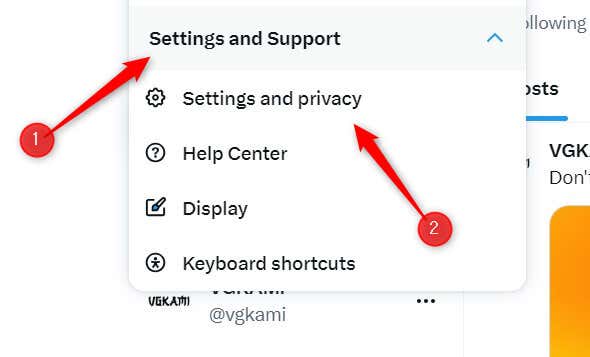
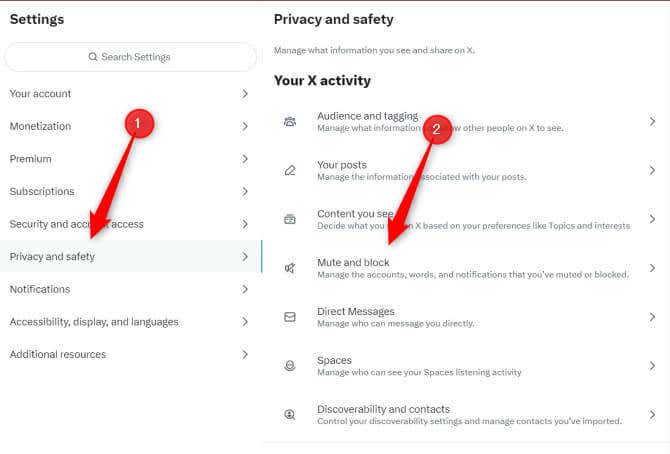
You can mute content on X for the Web, but the option is a bit buried. These terms will no longer appear to you on X unless you specifically search for them.
How to Mute Content on X (Twitter) for iOS and Android
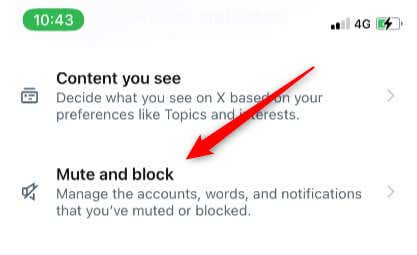
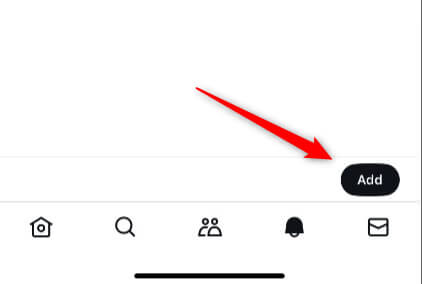
Most people use X on iOS and Android, so it’s no surprise that you can also take advantage of the mute feature here. Here’s how it’s done. These terms will no longer appear to you on X unless you specifically search for it.
Take Control of Your Feed
The mute function on X is a personal curation tool, giving you control over what you see—or, more importantly, what you don’t want to see—while scrolling through your timeline or checking notifications. From avoiding spoilers to minimizing exposure to sensitive or disturbing content, muting is an effective way to tailor your online experience to your preferences.