What Does the Error Mean?
Like all social media platforms, Instagram has a massive problem with bots and spammers. To prevent these malicious Instagram accounts from taking over, they’ve implemented community guidelines restricting how many actions Instagram users can take in a specific time frame. If you go against these guidelines, the following message might pop up: “Try again later. We limit how often you can do certain things on Instagram to protect our community. Tell us if you think we made a mistake.” If you receive this message, it means that your Instagram account has been flagged for suspicious activity or that you’ve surpassed some of Instagram’s limits. This limitation expires, and you’ll only have to wait a few hours to post again. If Instagram keeps sending you the “We limit how often” message, it means you violated Instagram’s rules. If you continue with your current practices, you will receive an Instagram ban. In this case, you’ll receive the message: “Your account has been disabled for violating our terms.” You’ll then have to wait 48 hours to a week to regain access.
What Causes the Error?
Instagram may restrict your account for many reasons. Although there are no clearly defined limits for many actions, Instagram monitors how many actions you take daily. If you post or comment too much, Instagram might flag you as a bot or spammer and prevent you from posting anymore. The daily limits are different, depending on your date of registration, daily average activity, and the number of followers. It seems like larger, more active accounts are allowed to follow and unfollow more people than smaller accounts. If you’re receiving this Instagram error, it could be for: However, you may also receive this message if you’ve violated Instagram’s community guidelines. That happens when you: You might also receive the “Your Post Goes Against Our Community Guidelines” message when you do any of the above.
What Are Instagram Limitations?
As noted earlier, Instagram restricts or limits your account when you violate the platform’s Community Guidelines or Terms of Use. Limitations applied to your Instagram account will vary depending on the violation. You might be restricted from certain things on Instagram, like:
Following other Instagram accounts. Going live. Liking any Instagram post. Commenting on a post. Sending direct messages.
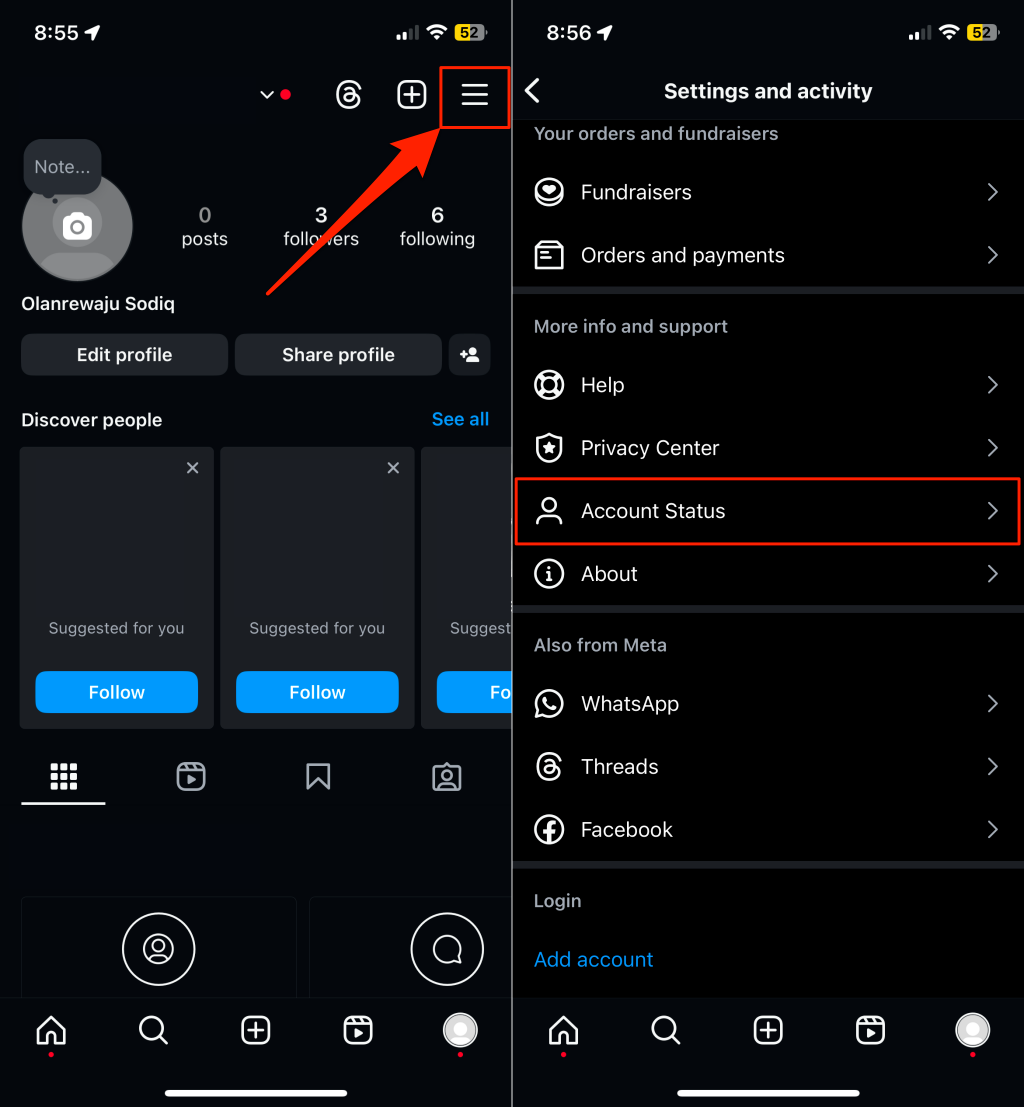
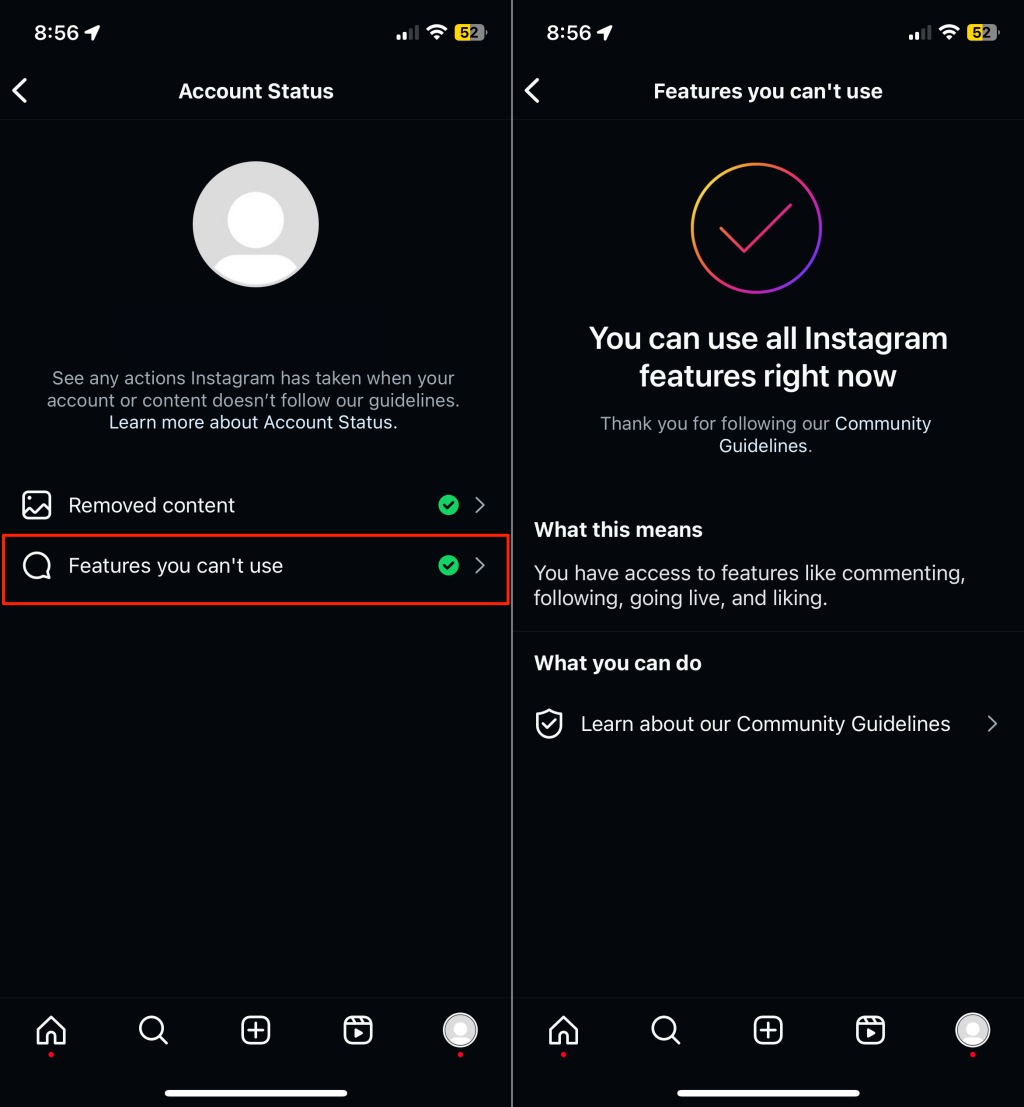
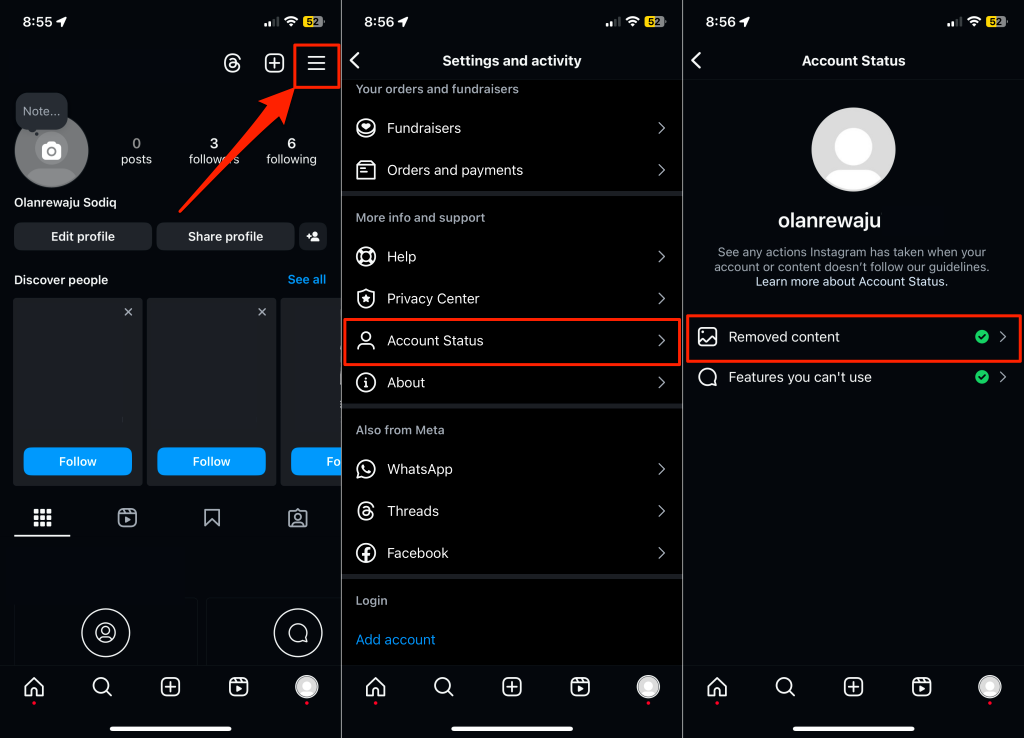
If you’re getting the “We limit how often you can do certain things on Instagram” error, use the “Account Status” tool to check the features you’re (currently) restricted from using.
You should see a list of features you can’t use due to a restriction or violation.
6 Easy Steps to Follow to Fix the Instagram Limit Error Message
Here are five ways you can fix the “We limit how often you can do certain things on Instagram” error message.
1. Refresh Instagram
The first thing to try is to refresh your app — Instagram may have blocked your account via your IP address or by the device you’re using. Try the following: These might help you bypass the ban. Otherwise, try the next step.
2. Request a Content Review
Does the “Account Status” tool show that you can’t use certain features due to the removal of forbidden content? Requesting a review of the removed content might undo the restrictions placed on your account.
3. Report the Error to Instagram
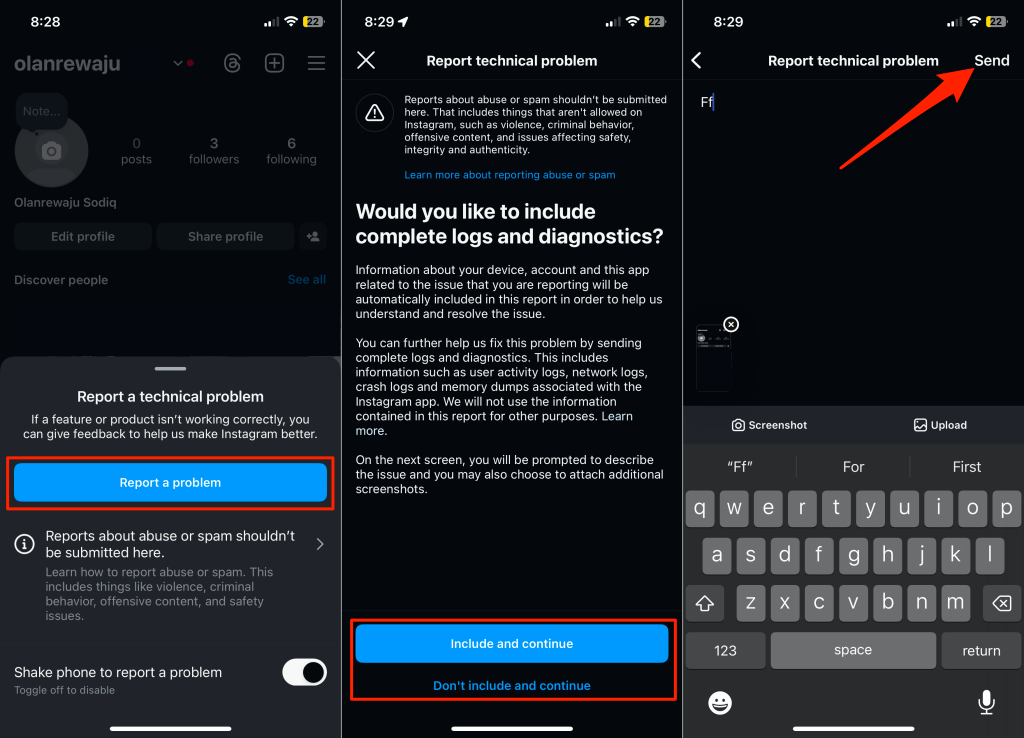
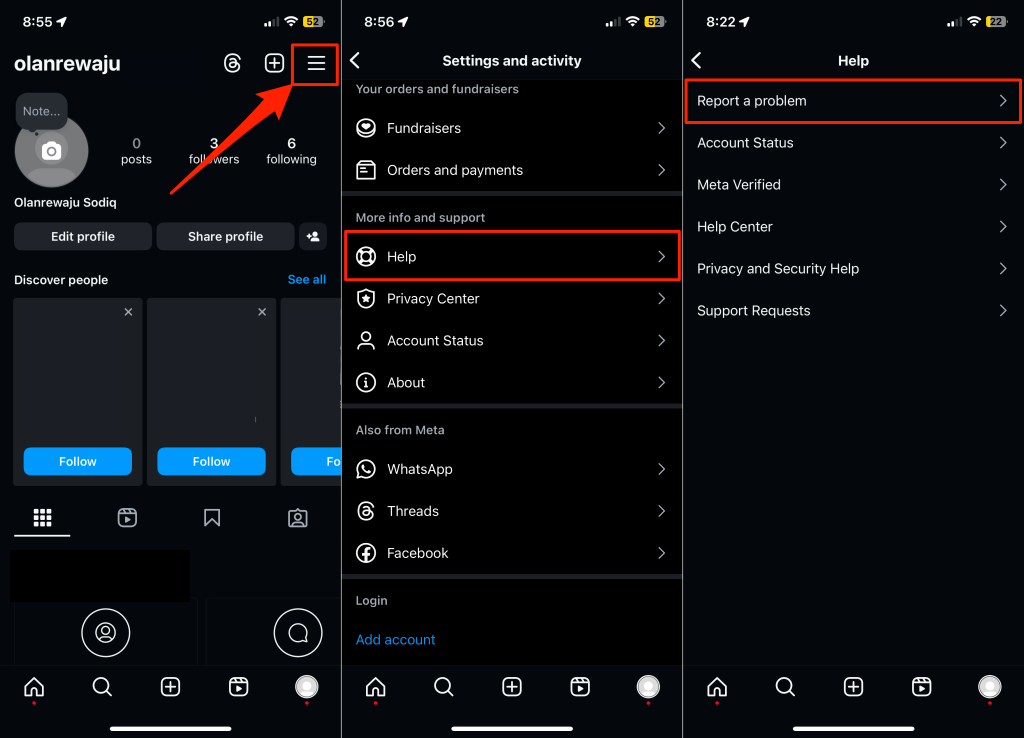
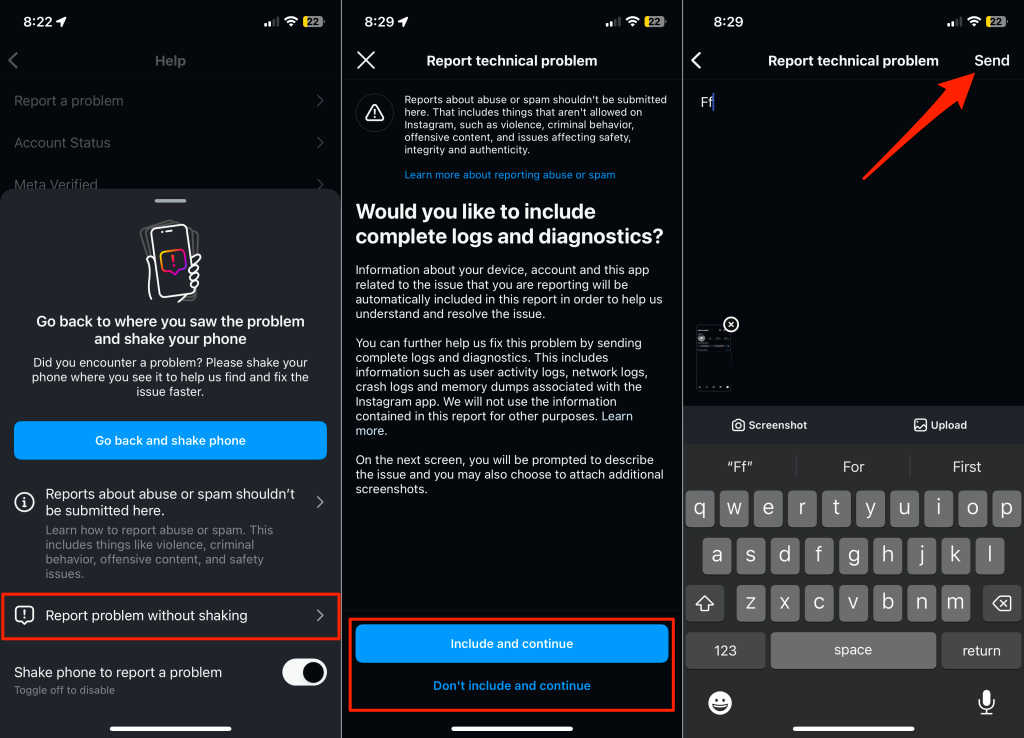
If your content doesn’t violate any guidelines but your account is restricted, contact Instagram’s support team. The “We limit how often you can do certain things on Instagram” error might be due to a technical malfunction or glitch with the Instagram app. The Instagram team will review your activity and decide whether or not to remove the ban. Shake your phone on the page where the error message appears and tap Report a problem. Choose whether or not to include log and diagnostics information in your report to Instagram Support. Then, type some explanations about the feature you can’t use and tap Send. You can also manually send the report to Instagram through the Settings menu.
Instagram’s response time isn’t the fastest, so expect to get a reply in a day or more.
4. Grow Your Account Organically
Instagram seems to give special conditions to accounts that meet specific criteria. For instance, new accounts appear to have stricter limits, while accounts with more followers (and followed accounts) have lenient limits. Likewise, Instagram is less likely to restrict features available to accounts with top-quality and engaging posts—given they don’t violate any Community Guidelines. There are ways to organically increase your activities on the app to avoid getting the Instagram limit error. The trick is gradually increasing the number of actions you take every day. For instance, slowly follow more people and comment more often. But avoid spam comments—commenting the same thing on multiple posts or leaving multiple comments on a single post. Also, avoid posting too many stories, reels, or pictures every day, especially if your account is new. Taking your Instagram journey slowly positions your account as normal and legitimate, which might loosen your restrictions.
5. Use a Different or Backup Account
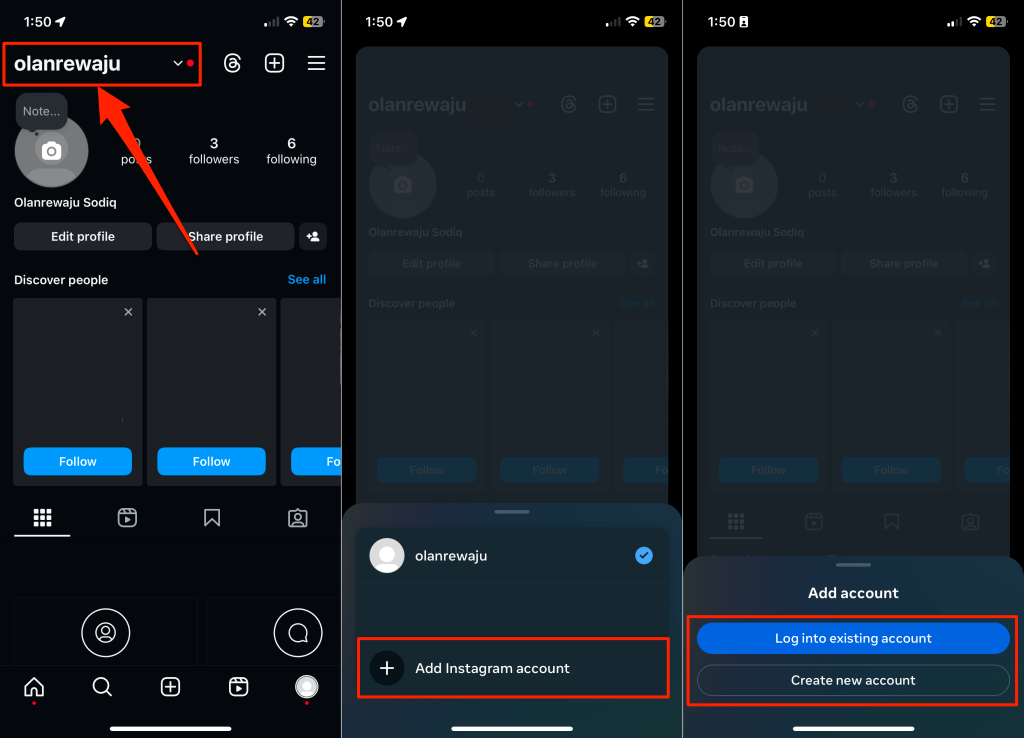
Creating a new account lets you continue to like and comment on your favorite content if your primary account gets restricted. While this doesn’t solve the problem, it gives you a quick workaround to bypass the Instagram algorithms and continue to enjoy the app.
6. Use Instagram Automation Tools
If you keep getting an action block because of your Instagram activity, plenty of tools can help. These solutions have been developed to automate and optimize your Instagram stories, posts, comments, and likes. Many influencers use these to save time so they don’t have to think about the best times to post or how to avoid Instagram’s limits. These tools act within restrictions like character limits and story limits and maintain as much engagement as possible with your followers. Examples include SocialPilot and Kicksta. Keep in mind that Instagram is trying to reduce the number of third-party apps being used, so this may backfire in the future.
Enjoy a Restriction-Free Instagram
Hopefully, the fixes we’ve provided in this article should help you get past the Instagram ban so that you can continue to post, comment, and like as much as you need to. If the error persists, switch to TikTok or Facebook until Instagram lifts the restriction.
1. What actions are limited on Instagram?
When you excessively perform the same action within an unusual timeframe, Instagram can limit the features for a few hours. Instagram may restrict you from liking posts, commenting, following other users, and going live.
2. Can I appeal or request to lift the restriction on my Instagram account?
Yes, you can. If the restriction is due to content removal or policy/guideline violation, use the “Account Status” tool to request a review. Contact Instagram’s support team if the restriction isn’t due to any violation.
3. Can I still use other features of Instagram while encountering this error?
Yes, you can. Instagram limitations are often limited to a specific feature. For example, if you’re restricted from going live, you can still like posts, leave comments, and use direct messaging.
4. How long do Instagram restrictions last?
Instagram restrictions are usually temporary but don’t have a fixed lifespan. If you can’t use certain features, expect the limitation to last 24-48 hours.