This might be to save storage space on your device, or simply because you don’t listen to those songs anymore. We’ll show you how to remove downloads from Spotify on your Android or iOS device, as well as how to do it on your PC and on the web.
How to Remove Downloads from Spotify on Android and iOS
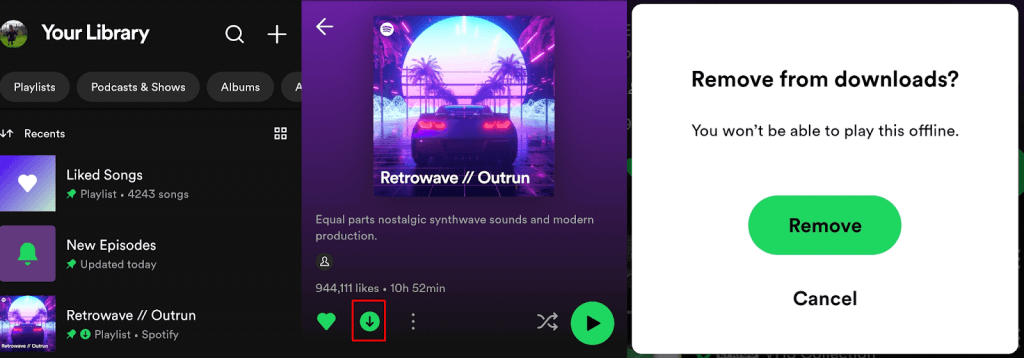
We’ll start with the Android and iOS apps, as they’re the most popular options for listening to Spotify on the go. If your phone doesn’t have much storage space, you might want to remove your downloaded tracks to save valuable space. Here’s how to remove downloads from Spotify in the mobile app — the steps are the same across both the Android and iOS apps. Note: If you’ve downloaded an entire album or playlist, you can’t delete individual tracks from your Spotify downloads, only the entire album or playlist.
How to Remove Downloads From Spotify on Your PC
If you’ve downloaded music from Spotify to your PC, it’s easy to remove these files by using the Spotify app for Windows or Mac — or you can access Spotify through your web browser.
Removing Downloads From Spotify on the App
Here’s how to delete downloaded music from Spotify on your Windows PC or Mac computer using the Spotify app. The steps to follow are the same regardless of which OS you’re using.
The selected track, playlist, or album will now be deleted from your Spotify downloads on your computer.
Removing Downloads From Spotify on the Web
Unfortunately, the Spotify web player doesn’t currently give you the option to download songs, albums, or playlists to your PC or mobile device. When using the web player at open.spotify.com, you’ll notice there’s no green download button next to albums, playlists, or tracks. If you want to download music to your Spotify on PC, you’ll need to use the Windows or Mac app to manage your downloads. As you can see, it’s quick and easy to remove downloads from Spotify using the mobile app on Android or iOS devices or on your Windows PC or Mac using the app. Remember though that you can’t delete or remove individual tracks from a downloaded album or playlist — when you click the green download button to remove downloaded music, you’ll be removing the entire playlist or album.